
The Ergonomics of Modal Navigation: Bringing Vim Motions to macOS Clipboard Management
An in-depth analysis of modal keyboard navigation, Keystroke-Level Modeling (KLM), and how Vim-style keybindings eliminate context switching in clipboard workflows.
Clibo Engineering
Engineering & Systems Design
Table of Contents (8 sections)
When software engineers discuss Vim or Neovim, the conversation often revolves around speed. But the true value of modal editing is not raw typing words-per-minute. It is cognitive continuity—the ability to manipulate code without taking your hands off the home row or shifting mental focus from your logic to the physical mechanics of a mouse cursor.
Yet, despite investing years refining terminal configurations, tmux layouts, and modal editor keymaps, most developers hit an ergonomic bottleneck every time they open a system utility: they are forced to grab their trackpad, locate a cursor, and click a list item.
This article examines the Human-Computer Interaction (HCI) metrics behind keyboard-first workflows, the state machine architecture of modal clipboard navigation, and how bringing Vim motions to the macOS clipboard eliminates workflow friction.
Key Takeaways (TL;DR)
- The Homing Penalty: According to Card, Moran, and Newell’s Keystroke-Level Model (KLM), moving a hand from keyboard to mouse and back introduces an unavoidable 800ms to 1200ms cognitive latency penalty.
- Modal State Engine: Modal navigation divides interaction into explicit operational states (Normal mode for navigation, Search mode for querying, Action mode for execution).
- Home Row Retention: Using j/k for directional scrolling and / for regex search keeps interaction purely keyboard-driven.
- Vim Register Synergy: Aligning your system clipboard manager with Neovim’s
"+and"*registers creates a unified copy-paste pipeline across terminal and GUI apps.
1. The Ergonomics of Trackpad Latency: A KLM-GOMS Analysis
In Human-Computer Interaction research, the Keystroke-Level Model (KLM) provides an established mathematical framework for calculating the time required for a skilled user to execute routine tasks on a computer.
Under KLM, executing a single clipboard retrieval using a traditional GUI manager breaks down into the following discrete operator stages:
+-----------------------------------------------------------------------+
|                Traditional GUI Clipboard Operation (KLM)              |
+-----------------------------------------------------------------------+
|  1. H (Homing)       : Move right hand from home row to mouse -> 400ms|
|  2. P (Pointing)     : Move cursor to clipboard manager list  -> 1100ms|
|  3. M (Mental Prep)  : Visually scan list for target clip     -> 1200ms|
|  4. K (Keystroke/Click): Click target row to select and paste -> 200ms|
|  5. H (Homing)       : Return hand to keyboard home row       -> 400ms|
|                                                                       |
|  TOTAL TIME PER RETRIEVAL: ~3,300ms (3.3 seconds)                     |
+-----------------------------------------------------------------------+
Now, consider the equivalent operation using a modal keyboard clipboard manager like Clibo:
+-----------------------------------------------------------------------+
|                Modal Keyboard Clipboard Operation (KLM)               |
+-----------------------------------------------------------------------+
|  1. K (HotKey)       : Press global trigger hotkey            -> 150ms|
|  2. M (Mental Prep)  : Type <kbd>/</kbd> + first 3 letters of snippet -> 300ms|
|  3. K (Keystrokes)   : Press <kbd>Enter</kbd> to paste directly      -> 150ms|
|                                                                       |
|  TOTAL TIME PER RETRIEVAL: ~600ms (0.6 seconds)                       |
+-----------------------------------------------------------------------+
By removing the Homing and Pointing physical operators, a modal clipboard manager achieves a 5.5x reduction in execution latency. When multiplied across 50 to 100 clipboard operations per workday, this saves substantial cognitive energy.
2. The Modal State Machine Architecture
Vim’s genius lies in modes. Rather than requiring awkward 4-key modifier chords (⌘+⌥+⇧+V), modal software reinterprets single keystrokes depending on the current active state.
A modal clipboard manager operates as a finite state machine with three primary states:
                 +-------------------+
                 |    CLOSED / HUD   |
                 +---------+---------+
                           | (Global Hotkey)
                           v
                 +-------------------+
            +--->|    NORMAL MODE    |<----+
            |    +----+---------+----+     |
            |         |         |          |
            |  (<kbd>/</kbd>) |         | (<kbd>dd</kbd>)  | (<kbd>Esc</kbd>)
            |         v         v          |
            |   +-----------+ +----------+ |
            |   |SEARCH MODE| |ACTION/DEL| |
            |   +-----+-----+ +----+-----+ |
            |         |            |       |
            +---------+------------+-------+
1. Normal Mode ([NORMAL])
- Purpose: Direct list traversal, preview inspection, and selection.
- Keybindings: Single alphanumeric keys navigate history directly without modifying text.
2. Search Mode ([SEARCH])
- Purpose: Real-time fuzzy filtering of historical items.
- Activation: Pressing / shifts focus into the search input.
- Escape: Pressing Esc returns immediately to Normal mode with the search filter active.
3. Action Execution ([ACTION])
- Purpose: Immediate operations on the highlighted item (Pinning, Deleting, Multi-Select).
3. Comprehensive Modal Keybindings Reference
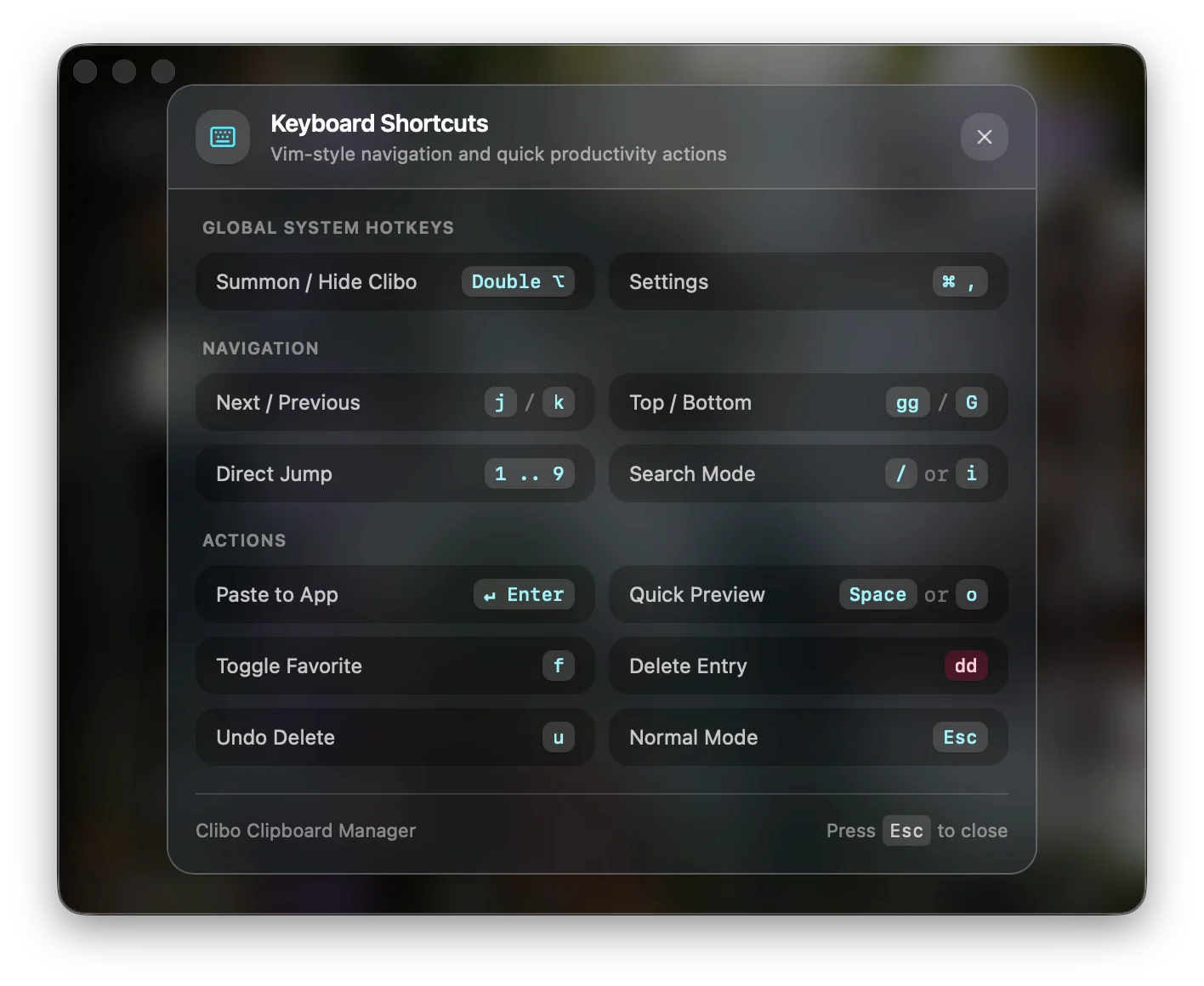
Below is the standard keymapping implemented in Clibo, designed to mirror modern Neovim conventions:
| Motion / Action | Keybinding | Functional Behavior |
|---|---|---|
| Move Down | j or ↓ | Move selection to the next older clip |
| Move Up | k or ↑ | Move selection to the next newer clip |
| Jump to Top | gg | Instantly select the most recent clip |
| Jump to Bottom | G | Jump to the oldest clip in current view |
| Page Down / Up | Ctrl+d / Ctrl+u | Scroll half-page viewport down / up |
| Enter Search | / | Open search bar and focus cursor |
| Exit Search | Esc | Unfocus search bar and return to list navigation |
| Paste Item | Enter | Paste selected clip into frontmost application |
| Quick Paste Index | 1 through 9 | Instantly paste items 1–9 from top of list |
| Delete from History | dd | Remove the highlighted item from local database |
| Pin / Favorite | p | Toggle pinned status to keep clip indefinitely |
| Toggle Code Preview | v | Expand multi-line syntax-highlighted code viewer |
4. Bridging System Clipboard with Neovim & Tmux Registers
If you work inside Neovim or Vim, your editor maintains internal registers alongside the macOS system clipboard:
"+: Synchronized with the macOS GUI clipboard (NSPasteboard)."*: The primary selection register."0through"9: The numbered yank and deletion registers.
To create seamless interoperability between Neovim and your modal clipboard manager, add the following to your init.lua:
-- init.lua: Sync Neovim unnamed register with macOS system clipboard
vim.opt.clipboard = "unnamedplus"

-- Example: Explicit yank to system clipboard
vim.keymap.set({"n", "v"}, "<leader>y", [["+y]], { desc = "Yank to macOS system clipboard" })
vim.keymap.set("n", "<leader>Y", [["+Y]], { desc = "Yank line to macOS system clipboard" })
When you yank a block of code with <leader>y, it is written to NSPasteboard, instantly indexed by Clibo, and becomes searchable across your entire Mac.
Summary
Keyboard shortcuts are not merely about typing faster—they are about reducing friction. When every tool in your developer environment adheres to consistent modal navigation principles, your clipboard history feels like a native extension of your editor.
By replacing mouse-driven list scrolling with deterministic hjkl navigation, modal clipboard management delivers the ergonomics and focus developers expect from professional tooling.
About the Clibo Research Team
We build tools for developers who care deeply about local-first software, macOS systems engineering, and keyboard-centric productivity. Have thoughts or questions on this article? Feel free to reach out via support@clibo.app.
Related Technical Essays
View all →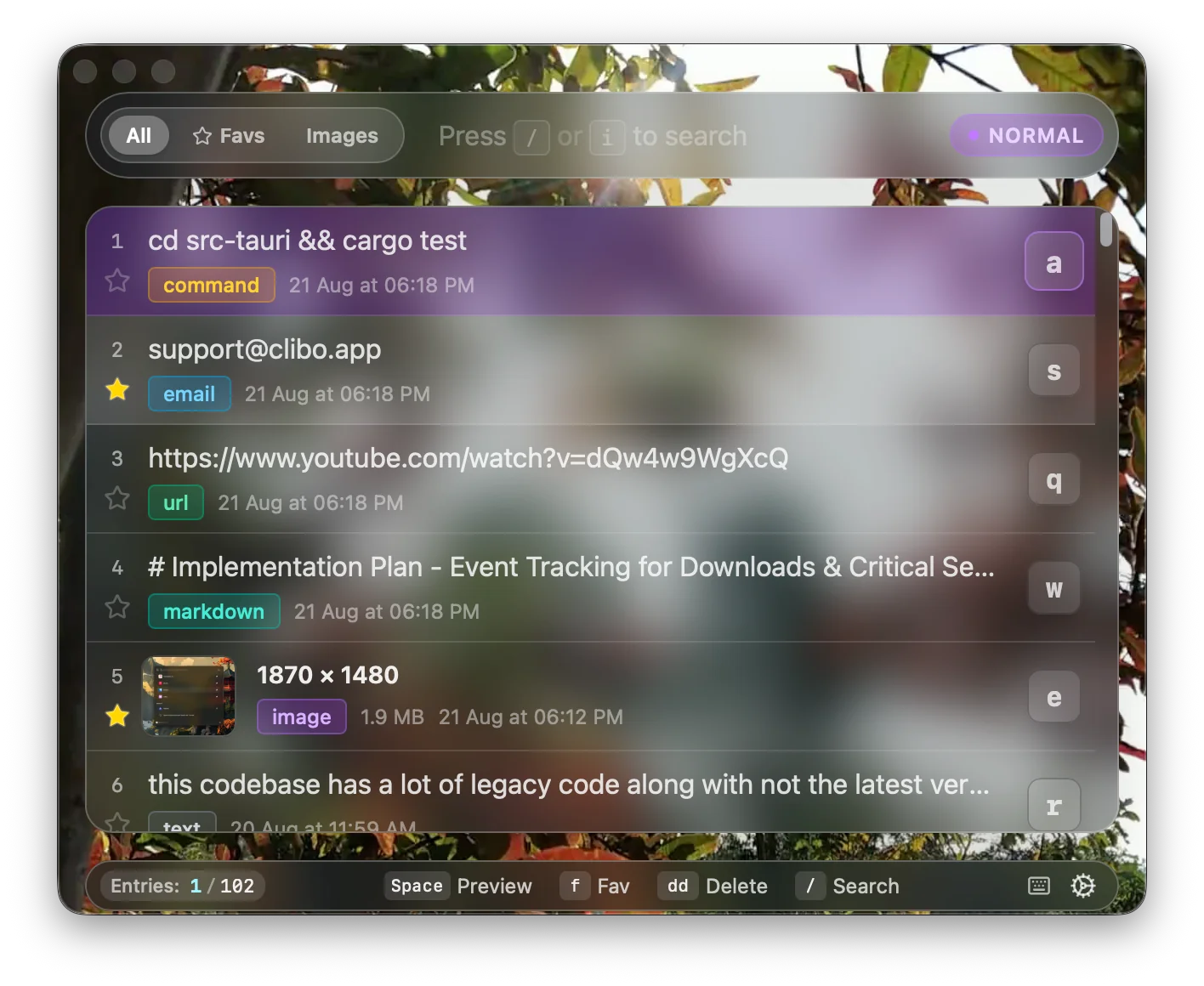
Why Developers Actually Switch Clipboard Manager Apps (Maccy, Alfred, Paste → Clibo)
Honest comparison of Maccy, Alfred, Paste, and Clibo clipboard manager apps. Real trade-offs, no strawmen — including when you should stay with your current tool.
The 2026 Mac Clipboard Manager Comparison Matrix: Speed, Privacy & Workflow
An objective, technical benchmark comparing Maccy, Raycast, Paste, Alfred, and Clibo across memory usage, invocation latency, privacy, and keyboard navigation.